One e-signature, many applications!

Run your business the way you like. Sign and seal documents electronically. From any device, wherever you are, entirely remotely.


Woman sitting on a navy pouf holding a phone
Man in a white shirt holding a phone with the mSzafir app open

Qualified single-use signature

The perfect solution if you need to sign a single document.

Long term e-signature

For those who frequently sign documents, both for work and personal purposes. Anywhere and anytime.

Mobile application activation

Choose what you will use and see how to activate the app. If you have a long-term mSzafir certificate and a sealing certificate, activate the mobile app for each on a separate device. See how to do it, step by step.


I have an mSzafir certificate for signing

I have an mSzafir seal certificate

Download the app

  • 1

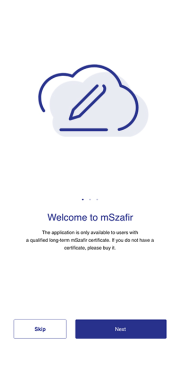
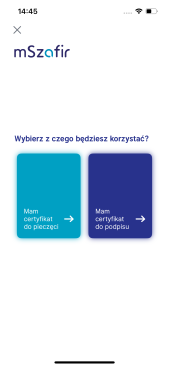
    Launch the app

    Choose what you will use and see how to activate the app. If you have a long-term mSzafir certificate and a sealing certificate, activate the mobile app for each on a separate device. See how to do it, step by step.
  • 2

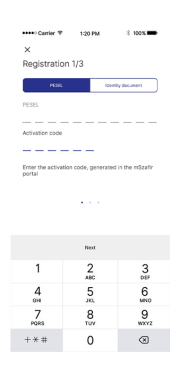
    Enter the data

    Enter your PESEL number if the certificate purchase was confirmed with mojeID or a qualified certificate.

    or

    enter the ID document number from the qualified certificate which was used to confirm your identity.
  • 3

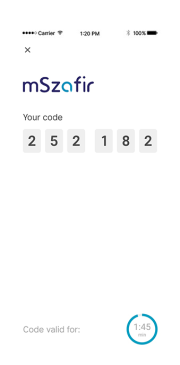
    Generate and enter the code

    A code for app activation will be generated in the mSzafir portal, which you need to enter on the device
  • 4

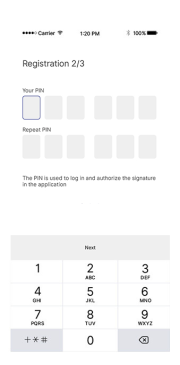
    Assign a PIN code

    Enter the PIN code that you will use to log in to the application.
  • 5

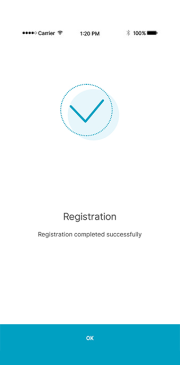
    Activation

    The application activation process has been started. The application will inform you when it is finished.

Activate with mojeID

Activate with a qualified certificate

  • ekran1_en.jpg
  • ekran2b_en.jpg
  • ekran3_en.jpg
  • ekran4_en.jpg
  • ekran5_en.jpg
  • 1

    Log in to the mSzafir portal

    Go to the "Mobile applications" tab and click "Generate activation code". The application can be activated by a person authorized to generate the seal and share the seal with other people using the mSzafir portal.
  • 2

    Application activation

    The provided activation code (generated on the mSzafir portal) should be entered in the mobile application together with the organization identifier that was included in the certificate (NIP or KRS number).
  • 3

    Stamp documents

    And that's it! You can now stamp your documents.
  • e-seal_en_1.PNG
  • logowanie do portalu.png

Activate with mojeID

Activate with a qualified certificate

Download the app

mSzafir variants

If you need more certificates contact us

Qualified one-time use certificate

15,00 zł netto 18,45 zł brutto
  • 15 minutes – the certificate’s validity period

  • Sign 1 document in a PDF format (max 10 MB, an interactive PDF form cannot be signed)

  • Identity validation method before issuing the certificate:

    • mojeID (e-banking)
  • Signing method:

    1. Directly in the certificate purchase process-> learn how to
    2. Through the Client Portal integrated with mSzafir
    • on any device with a browser
    • no additional software required
  • Keypair authorization method

    • mojeID (e-banking)

Qualified certificate with a long period of validity

from 238,00 zł netto 292,74 zł brutto
  • 1 or 2 years – the certificate’s validity period

  • Sign from 1k to 100k files in any format, depending on the chosen limit learn how to

  • Identity validation method before issuing the certificate:

    • mojeID (e-banking)
    • a KIR-issued qualified certificate on a cryptographic card
    • a visit to a KIR branch
  • Signing method:

    1. Through the mSzafir portal –learn how to
    • files in the PDF format (max 10 MB)
    • on any device with a browser
    • no additional software required
    1. With the mobile app – learn how to
    • files in the PDF format saved on your phone (max 5 MB)
    1. With any app with a signing function (e.g. Szafir, Płatnik, eDeklaracje, Adobe Reader DC)
    1. Through the Client Portal integrated with mSzafir
    • files in the PDF format
    • on any device with a browser
    • no additional software required
  • Keypair authorization method

    • the mSzafir app
      Learn how to activate the app

Qualified electronic seal

from 749,00 zł netto 921,27 zł brutto
  • 1 or 2 years – the seal’s validity period

  • Seal from 500 to 100k files in any format, depending on the chosen limit

  • Identity validation method before issuing the certificate:

    • any qualified e-signature certificate
    • a visit to a KIR branch
  • Stamping method:

    1. Through the mSzafir portal –learn how to
    • files in the PDF format (max 10 MB)
    • on any device with a browser
    • no additional software required
    1. With the mobile app – learn how to
    • files in the PDF format saved on your phone (max 5 MB)
    1. With any app with a signing function (e.g. Szafir, Płatnik, eDeklaracje, Adobe Reader DC)
  • Keypair authorization method

    • the mSzafir app
      Learn how to activate the app

How to sign mSzafir documents

One-time certificate
Long-term certificate
Electronic seal
One-time certificate
  1. Buy a one-time mSzafir signature

  2. Confirm your identity online

    You can do this via electronic banking if you have an account in one of the following banks: PKO Bank Polski, Inteligo, mBank, Pekao, ING, Millennium

  3. Select the PDF file and sign it

Happy woman with a laptop on her lap
Long-term certificate
  1. Buy mobile e-signature mSzafir

    Select validity period and signature limit.

  2. Confirm your identity in your chosen way:

    • online in electronic banking
    • online with a KIR qualified certificate (use your certificate stored on the card)
    • at a selected branch of KIR
  3. Use your e-signature as you like

04_zdj_3.png
  • In any signing application

    Download CloudSigner software, install and sign files of any format and size

  • On a platform integrated with mSzafir

    Take advantage pf the integration of your solution with mSzafir and give your employees and customers the ability to sign directly from your system. Writee to us and we will advice you on how to do this.

See how you can sign files in different formats:

Electronic seal
  1. Configure the product

    Select the certificate validity period and seal limit

  2. Confirm the seal order on behalf on your organization

    Submit the order for signature electronically or in paper to persons authorized to represent your organization and return it to us.

  3. Generate an electronic seal

    Once we have confirmed your order, we verify the identity of the authorized person (online with a qualified certificate or at a selected branch) and generate a seal certificate for your organization.

04_zdj_3a.png

See how you can sign and seal files in various formats:

  • mSzafir - integration variant

    • for those who want to integrate their processes with electronic signatures, we offer an integration option that will provide both external and internal users with an easy and intuitive process for obtaining certificates and singing documents
    • the process of generating certificates and documents signing starts directly in our customer portal - and can be finalized with a few clicks. Signed documents do not leave the customer portal and remain under its exclusive control
    • the integration variant allows for a qualified signatures to be used for signing fully on-line, without requiring users to install or to configure any additional software or to use smart cards or readers
    • direct acces to the integration environment permits solution testing prior to launch in the production environment

    Enable e-signature in your systems

    Team of people sitting at a table in an office

    Enable e-signature in your systems

    • finalize and sign agreements, e/g/ with service providers
    • exchange correspondence wih public authorities
    • make commercial bids
    • participate in auctions and in bidding procedures
    • issue corporate documents, e.g. e-invoices
    • improve documents workflow and archiving
    • prepare medical documentatnion

    How can you use mSzafir in your company?

    Man with a phone against a city backdrop at night

    How can you use mSzafir in your company?

FAQ

  1. How do I unlock the mSzafir app?
  2. Which files can I sign? Which format? Which size?
  3. Is mSzafir signatures’ legal effect equivalent to handwritten signatures?
  4. How to buy a one-time certificate?
  5. How to buy a long-term certificate?
  6. How to validate one's identity remotely using the KIR qualified certificate?

Another meeting and documents are waiting?

Sign on your phone, wherever you are!

Man in a suit running from documents, with the mSzafir app in the foreground

Complete the data and we will contact you

In accordance with the Article 13(1)(2) and Article 14(1)(2) of the General Data Protection Regulation of 27 April 2016 on the protection of individuals with regard to the processing of personal data and on the free movement of such data and the repealing of the Directive 95/46/EC (GDPR), we would like to inform you that:

the controller of personal data is Krajowa Izba Rozliczeniowa Spółka Akcyjna (KIR) with its registered office in Warsaw at ul. rtm. Witolda Pileckiego 65, 02-781 Warszawa, Poland, KRS 0000113064;
the personal data will be processed in order to:
process requests related to an agreement concluded with KIR or
process requests other than those related to an agreement concluded with KIR, pursuant to art. 6(1)(a) and (b) of the GDPR;
personal data will be stored during the term necessary for the agreement execution or other requests processing;
you have the right to access the content of your data and the right to rectify, delete, limit its processing, the right to transfer the data, and in case of processing on the basis of the granted consent - the right to withdraw the consent at any time without affecting the validity of the processing, which was performed on the basis of the consent granted prior to its withdrawal;
you have the right to file a complaint with the PUODO if you believe that the processing of provided personal data breaches the personal data protection regulations;
provisioning of personal data is optional but is needed for the request processing;
KIR Data Protection Inspector: IOD@kir.pl.

Thank you - the form has been submitted